
1.VS201X 以下任一版本都可以: Visual Studio Community 201X, Visual Studio Professional 201X,Visual Studio Enterprise 201X. (根据:以前的 WDK 版本和其他下载 - Windows drivers | Microsoft Docs,Visual studio也不是任一版本都可以安装的, 见下面图(5) Windows 版本/build No. 及对应的Visual studio版本)
2.Windows 11 SDK (版本:10.0.XXXXX), 有两种途径安装SDK:1) 在VS2019 installer 中选择安装,见下面的图(1)。2)在SDK的存档页面选择安装: ( Windows SDK 存档 - Windows 应用开发)
3.Windows 11 WDK(Windows Driver kit),版本:10.0.XXXXX , ( 以前的 WDK 版本和其他下载 - Windows drivers | Microsoft Docs)
ERROR: Task "Installing VC Redist (x64)" failed to complete successfully. Look at the logs in the driver test group explorer for more details on the failure.
错误的解决办法是卸载掉系统安装的vc运行库
sdk和wdk必须要和系统的编译版本号相等,比如下面是19041相同才可以在vs中配置成功,要不会出现Windows Driver Testing Framework 安装失败错误
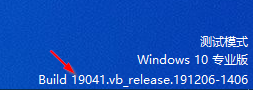
如果出现创建还原点错误,不用管它.
老版本vs wdk sdk下载地址
https://learn.microsoft.com/zh-cn/windows-hardware/drivers/legacy-wdk-downloads
windows 各版本支持的sdk列表
https://developer.microsoft.com/zh-cn/windows/downloads/sdk-archive
1. 启用测试签名
bcdedit /set testsigning on
bcdedit /set nointegritychecks on
2. 禁用驱动强制签名
bcdedit /set loadoptions DISABLE_INTEGRITY_CHECKS
bcdedit /set advancedoptions on
3. 重启
shutdown /r /t 0
WinDbg Preview 商店版下载方式
首先打开商店搜索WinDbghttps://apps.microsoft.com/store/detail/windbg-preview/9PGJGD53TN86?hl=zh-cn&gl=CN
得到9PGJGD53TN86应用标识
再通过这个网站下载商店应用安装包https://store.rg-adguard.net
输入框左边URL改成ProductId,右边输入9PGJGD53TN86点击按钮
下载最新版本的msixbundle格式的文件。
下载后直接7zip解压,再找到x64.app解压,就会看到DbgX.Shell.exe,运行就可以了。不用安装
Comments NOTHING